
Table of Contents
Introduction
In today’s digital world, visuals speak louder than words. Whether it’s a photo on social media, a product image in an online store, or a presentation slide, high-quality images make all the difference. But sometimes, the images we have are small, blurry, or pixelated. This is where image upscaler free tools come into play image upscaler free.
An image upscaler is a tool that enlarges images without losing too much quality. Unlike traditional resizing, which often makes pictures look stretched or blurred, modern AI-powered upscalers can rebuild details, sharpen edges, and enhance clarity. And the best part? Many of these tools are completely free and work directly online as photo enhancers image upscaler free.
In this article, we’ll look at the 10 best image upscaler free tools you can use right now to boost your photos online.
What is an Image Upscaler?
An image upscaler is a tool that helps to increase the size and resolution of a photo without making it look blurry or pixelated. Normally, when you stretch a small image, the quality drops, and the picture looks unclear. But modern AI-based upscalers use smart algorithms to analyze every detail, fill in the missing pixels, and recreate a sharper version of the photo. This means you can enlarge an image 2x, 4x, or even 8x while still keeping it clear.
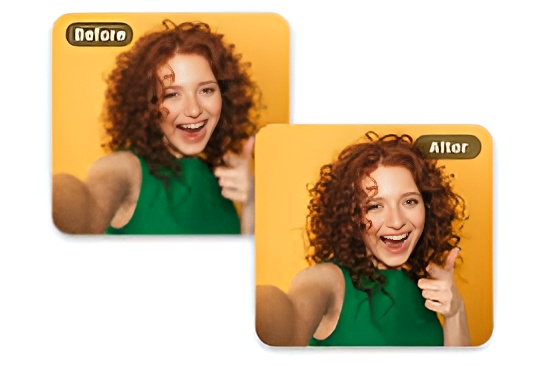
Benefits of using a free image upscaler:
- Produces clear, sharp, and professional-looking pictures.
- Saves time and money since you don’t need costly software.
- Perfect for eCommerce, social media, students, bloggers, and designers.
- Easy-to-use, even for complete beginners.
- Works online, so no need for heavy installation.
- Helps restore old or low-quality photos into high-resolution images.
10 Best Free Image Upscaler Tools
1. Let’s Enhance
Let’s Enhance is widely known for producing very clean, natural-looking upscaled images by combining multiple AI approaches: super-resolution, color correction, and texture restoration.
Where many simple upscalers only stretch pixels, Let’s Enhance attempts to recreate plausible details — sharper edges, clearer textures, and better color balance — so that an enlarged product photo or portrait looks like it was shot at higher resolution.
The interface is web-based and straightforward: upload, choose an enhancement preset (e.g., e-commerce, portrait, or photo), pick the upscaling multiplier (commonly 2x or 4x), and download after processing.
Technically, Let’s Enhance uses pre-trained neural networks optimized on large datasets of natural images. These networks learn how high-frequency details (hair strands, fabric weave, text edges) correlate with lower-resolution inputs, then synthesize those details when upscaling. Because of that, results often feel authentic rather than “over-sharpened” or artificial image upscaler free.
The platform also includes automatic color and exposure correction, which is helpful if your source file is a bit flat or poorly lit image upscaler free.
For e-commerce sellers, image upscaler free Let’s Enhance is particularly useful: product shots become crisper, background textures cleaner, and color more accurate — all without re-shooting.
Photographers and portrait users will appreciate the skin-tone handling and detail preservation in eyes and hair. The batch processing feature makes it feasible to handle multiple files at once, saving time for larger catalogs image upscaler free.
The main limitation in the free tier is credit-based usage: you usually get a handful of free credits, enough to test and improve a few images, but heavy users will need a paid plan. Let’s Enhance also requires an account to manage credits and history, which is reasonable but means you should review privacy terms if you’re processing sensitive images.
Another point: while the AI does a great job in many cases, heavily compressed or extremely tiny images may still produce artifacts, so expectation management matters.
Tips to get the best results: start with the highest-quality source you have (less compression, original format if possible), crop to the subject before uploading when background is unnecessary, and use the platform’s presets (portrait/e-commerce) rather than a generic upscaler.
If color accuracy is critical, compare before-and-after on a calibrated monitor.
For repetitive workflows (product catalogs), use batch mode with consistent presets so the output looks uniform.
Who it’s best for: users who want professional-looking results without steep learning curves — small businesses, online sellers, bloggers, and photographers who need fast, high-quality upscaling and color fixes.
If you handle lots of images and need unlimited upscales, evaluate the paid plans; for occasional use, the free credits let you test the tool and see if it matches your needs.
2. Waifu2x
Waifu2x began as a specialized project to upscale anime-style artwork, where line work and flat colors require a different approach than natural photos. Its neural networks are tuned to preserve clean edges and reduce compression noise without introducing painterly artifacts.
Even though it was optimized for illustrations, the algorithm also performs well on certain types of photography — especially images with distinct edges or graphic elements.
A big advantage of Waifu2x is simplicity. Many web deployments are free and run in-browser or on lightweight servers. Typical options let you select noise reduction level and a scaling factor (2x is most common), then process the image.
Because the model emphasizes denoising and edge preservation rather than photorealistic texture synthesis, results look very clean for art and cartoons.
For photos with busy textures or natural grain (e.g., landscapes with foliage), Waifu2x might smooth too much or lose subtle natural detail image upscaler free.
Waifu2x is entirely free in many public instances, and it often does not add watermarks. That makes it excellent for hobbyists, illustrators, and content creators who need fast, free upscaling image upscaler free.
The interface is minimal, which is great for non-technical users. However, the project’s UI and maintenance vary across hosted versions — some look dated and offer limited format support or file-size caps.
Practical notes: if you’re working with anime, manga scans, digital art, or screenshots, Waifu2x is a top choice because it preserves line clarity and removes JPEG noise image upscaler free.
For photographic portraits or product images, run a small test first; sometimes a photorealistic AI will produce better results. Also, since free instances can be rate-limited, expect slower processing times at peak hours image upscaler free.
Limitations include lack of advanced editing tools and limited control over fine parameters.
The algorithm focuses on denoising and upscaling, so you won’t get color correction or texture enhancement options. Security-minded users should check the hosting site’s privacy statement; free web services sometimes delete uploaded images after processing, but confirmation is best practice.
Who it’s best for: artists, anime fans, illustrators, and anyone who needs a free, reliable edge-preserving upscaler. It’s a lightweight, no-frills option that delivers impressive results for the right image types.
3. ImgUpscaler
ImgUpscaler is a modern, web-first image upscaler that emphasizes simplicity and speed. Designed to be drag-and-drop friendly, it offers common upscaling multipliers (2x, 4x) and basic noise reduction options. The service uses convolutional neural networks trained on varied datasets, so it handles portraits, landscapes, and product photos reasonably well.
The main attraction is the clean interface: upload, pick scale, and download — which suits users who want quick results without fiddling with settings.
Unlike some tools that aggressively manipulate colors, ImgUpscaler often preserves the original look while improving sharpness and perceived detail.
For portrait work, facial features look natural; for landscape shots, textures such as rock and foliage become clearer without obvious upscaling artifacts. Batch processing is supported in paid tiers, but the free plan typically allows a limited number of images per week — enough for testing or light use.
Practical workflow tips: pre-crop to the subject to avoid upscaling unnecessary background detail; save a lossless source file (PNG or a high-quality JPEG) to improve results; and if you have compressed images, use the denoise option before scaling.
The UI also usually displays side-by-side comparisons, helping you judge whether the AI introduced unwanted changes.
Limitations are mainly about quotas and internet dependence. Free allowances can be modest, so frequent users may hit limits. Also, processing large batches or very high-resolution outputs often require payment.
Users should also verify whether ImgUpscaler temporarily stores images and for how long; most reputable services purge files within a set window, but checking their privacy policy is recommended.
Who it’s best for: casual users, bloggers, and social-media content creators who want fast, decent-quality upscales without learning advanced photo editing. It’s a strong option when you value speed and an easy interface.
4. VanceAI Image Upscaler
VanceAI presents itself as a feature-rich AI suite, and its image upscaler is among the most capable in terms of flexibility. It supports higher multipliers (often up to 8x) and offers different AI models targeted at varying needs — from “photo enhancement” models that keep natural textures to “art models” tuned for illustrations.
VanceAI also integrates sharpening, denoising, and color enhancement within the same pipeline, so you can perform multiple improvements in a single pass image upscaler free.
For users with old, scanned photos or heavily compressed images, VanceAI often recovers hidden detail better than simpler upscalers. The platform is cloud-based, has a polished UI, and provides batch processing for paid subscribers.
Output quality is generally high: fine textures like hair, fabric patterns, and printed text are handled gracefully. The additional models let you choose a more conservative or aggressive reconstruction style, which is useful when you need to preserve authenticity image upscaler free.
Downsides include a limited free tier and the fact that the best features are behind paid plans. Also, because the service offers many options, beginners can feel overwhelmed by choices. For privacy, VanceAI has a standard cloud-based workflow; if your images are private or sensitive, review retention and usage policies image upscaler free.
Practical tips: experiment with different AI modes on a single test image to see which model best matches your aesthetic needs. For product photography, use the e-commerce or photo model; for artistic images, try the art-focused model.
Also, upscale in steps (e.g., 2x and then another 2x) if you need a very large final image — sometimes multi-step upscaling yields more control over artifacts.
Who it’s best for: users who want high-quality, flexible results and are willing to invest in a paid tier for heavier use — professional content creators, photographers restoring old images, and businesses needing consistent, high-res output.
5. Deep Image
Deep Image targets professional and business workflows with a cloud-first approach and API access. If you need to integrate upscaling into a website, app, or e-commerce pipeline, Deep Image’s SDKs and API endpoints are a major advantage image upscaler free https://deep-image.ai/.
The underlying AI focuses on realistic texture reconstruction and noise reduction, producing outputs suitable for print and large-format uses when configured correctly.
Functionally, Deep Image supports bulk processing and automated workflows, allowing you to queue large batches and retrieve results programmatically. For product catalogs, this means you can build a process: upload raw images, run the upscaler with consistent presets, and automatically replace or store enhanced images image upscaler freedecodeai.

The service also often includes metadata handling and keeps track of processing history, which is useful for business audits or versioning.
Limitations in the free tier are standard: you get a set number of free credits, but larger businesses will need to pay for extensive usage. Also, because the service is integrated into other systems, initial setup for APIs requires technical knowledge.
Privacy and security are typically stronger here (enterprise-grade offerings usually include SLAs and data handling policies), but you should still check contract terms for sensitive data.
Practical tips: when integrating Deep Image into a pipeline, add pre-processing steps (crop, normalize exposure) to maximize AI effectiveness. Use consistent naming and metadata so the output can automatically map back to product IDs or content entries.
Test several preset combinations to choose one that matches your visual branding.
Who it’s best for: businesses and developers who want automated, scalable upscaling integrated into apps or e-commerce systems. Freelancers or agencies managing many client images will also find the batch and API features valuable.
6. Fotor Image Upscaler
Fotor is an all-in-one online photo editor that includes an image upscaler among other tools like background remover, retouching, and filters image upscaler free.
Its upscaler is convenient because it sits alongside common editing actions — you can crop, adjust exposure, and then upscale without leaving the browser. That integrated workflow makes Fotor attractive to content creators who want quick edits and improvements in one place.
The upscaler itself typically offers 2x–4x enlargement and basic noise reduction. Results are generally solid, and the visual editing context helps you make pre- or post-adjustments quickly. For social media managers who need to resize a post image and add polish, this is highly efficient image upscaler free.
For beginners, Fotor’s guided interface and templates minimize the learning curve.
However, the free plan has trade-offs: ads, limited exports, and possibly lower priority processing speed. If you need batch upscaling, pro-level features unlock that, but the subscription cost may be higher than single-purpose upscalers image upscaler free.
Another limitation: while Fotor is great for general improvements, it’s not always as specialized for raw texture reconstruction as some dedicated super-resolution services.
Practical tips: use Fotor’s basic edits (brightness, contrast, saturation) before upscaling if your image is flat. Save edits in lossless format when possible to avoid double compression.
If you need consistent branding across images, set up a template and apply the same upscaling workflow to each file.
Who it’s best for: casual users, social media operators, and small businesses wanting an all-in-one editor with easy upscaling. It’s ideal when you want editing and upscaling in the same quick workflow.
7. Upscale.media
Upscale.media is designed for fast, no-friction upscaling with a clear focus on being free for basic use. The service emphasizes simplicity: drag-and-drop, instant processing, and downloadable results without mandatory signup in many cases image upscaler free.
It supports common multipliers and provides noise reduction and sharpening tuned for clean output.
Because it’s streamlined, Upscale.media is perfect for users who need rapid improvements for avatars, web images, and quick social posts image upscaler free.
Many people appreciate that there’s no watermark and that the interface is uncluttered. Mobile support and a small app presence make on-the-go usage feasible.
That said, advanced options such as very high multipliers, batch quotas, or specialized AI models are generally paid features.
The free service is excellent for occasional needs but not for heavy professional workloads. Also, very large files or print-ready sizes may be limited by upload caps.
Tips: use Upscale.media for quick fixes where time matters — profile photos, thumbnails, and small product shots. If you need very high-resolution print files, test with a single sample first to see whether the output meets your standards.
Who it’s best for: individuals and small teams needing a free, fast upscaler for web and social images without logging in or installing software.
8. Pixbim Enlarge AI
Pixbim offers a desktop application rather than a pure web service, which changes the use case: since it runs locally, you don’t upload images to a server — a clear privacy and offline-use advantage image upscaler free.
The software uses AI to enlarge images and preserve details, and because it’s local, you can process large files without upload limits or bandwidth concerns.
The offline nature also means predictable performance based on your machine’s specs.
Pixbim often provides different enhancement modes and allows granular control for those who prefer to tweak results. For users with sensitive photos or tight privacy requirements, local processing is a major plus image upscaler free.
Limitations include a more limited free trial and a desktop-only workflow, meaning you need to install software and possibly pay for a license for full features.
The UI and experience can vary across OS versions. Also, the quality depends on the bundled AI model; updates and model improvements may come less frequently than cloud services that continuously retrain.
Tips: run a few different modes on a sample image to learn which settings best preserve the details you care about. Because processing is local, set aside enough time and ensure your machine has enough memory for large images.
Who it’s best for: professionals and privacy-conscious users who prefer offline tools and who process large files regularly without wanting to transfer data to cloud servers.
9. Bigjpg
Bigjpg is a specialized upscaler that started with anime and illustration but expanded to handle photographs as well. It uses neural networks trained separately on artwork and photos, letting you choose the mode that matches your source.
This dual-training strategy helps preserve drawn lines in artwork while retaining natural textures in photographs.
The platform supports up to 4x or 8x scaling depending on plan, and it emphasizes noise reduction alongside enlargement.
For artists, game developers, and illustrators who need to scale sprites, assets, or portfolio images without re-rendering, Bigjpg is a popular choice. The free tier allows testing, but processing speed and daily quotas are limited.
Practical usage: select the artwork or photo model depending on the input; use higher scale factors only when necessary; and avoid upscaling severely compressed images without first applying denoise options. For large batches, a paid plan significantly speeds up processing and removes daily caps image upscaler free.
Limitations are similar to other free services: queue times, slower processing for free users, and caps on daily uses image upscaler free.
However, the focused training often produces superior results for illustrations compared to general-purpose photo upscalers.
Who it’s best for: illustrators, anime artists, and anyone working with digital art who needs a reliable upscaler trained specifically on similar data image upscaler free.
10. Adobe Photoshop (Free Trial)
Adobe Photoshop’s Super Resolution (part of Camera Raw) brings professional-grade super-resolution into a widely used editing suite. Unlike single-purpose web upscalers, Photoshop gives you complete control: image upscaler free you can upscale with Super Resolution and then refine with layers, masks, selective sharpening, local color correction, and high-end retouching tools. The result — when used by someone who knows the software — can be print-quality and extremely faithful.
Super Resolution uses machine learning trained on massive datasets and is integrated so you can preserve RAW data advantages image upscaler free.
If you’re processing photography for print, high-end portfolios, or client deliverables, Photoshop’s tools are hard to beat. The downside is cost and complexity: after the trial, Photoshop requires a subscription, and learning the interface has a steeper curve.
Tips: use Super Resolution on RAW files when possible, because raw provides more original data and avoids double compression.
After upscaling, use selective masks and adjustment layers to fix any local tone or color shifts. For bulk jobs, Lightroom + Photoshop actions can be combined to automate parts of the workflow.

Comparison Table
| Tool | Free Limitations | Best For | Ease of Use | AI-Powered |
|---|---|---|---|---|
| Let’s Enhance | Limited credits | E-commerce images | ⭐⭐⭐⭐ | Yes |
| Waifu2x | Unlimited | Anime/artwork | ⭐⭐⭐ | Yes |
| ImgUpscaler | Weekly limit | Portraits, photos | ⭐⭐⭐⭐ | Yes |
| VanceAI | Limited free | Blurry/old images | ⭐⭐⭐⭐ | Yes |
| Deep Image | Limited free | Businesses | ⭐⭐⭐⭐ | Yes |
| Fotor | Ads in free plan | General editing | ⭐⭐⭐⭐ | Yes |
| Upscale.media | Mostly free | Quick upscaling | ⭐⭐⭐⭐⭐ | Yes |
| Pixbim | Free trial only | Offline use | ⭐⭐⭐ | Yes |
| Bigjpg | Slow free mode | Anime/digital art | ⭐⭐⭐⭐ | Yes |
| Photoshop Trial | 7-day free | Professional users | ⭐⭐⭐⭐⭐ | Yes |
Conclusion
With so many free image upscaler tools available, anyone can now improve their photos without expensive software or advanced skills. Whether you’re an online seller, student, designer, or just someone who wants better pictures, these tools can help image upscaler free.
- For quick and free results, try Upscale.media or Waifu2x.
- For professional needs, Let’s Enhance or VanceAI are excellent image upscaler free image upscaler free.
- And if you want the highest possible quality, Adobe Photoshop (trial) is unmatched.
So next time you have a blurry photo, don’t delete it — just run it through an online photo enhancer and give it new life image upscaler free.