
In today’s fast-paced digital world, video content is king. Whether you’re a YouTuber, freelancer, marketer, or student, creating engaging videos quickly is essential. That’s where AI video editing tools come in—making AI video cutting faster, smarter, and more efficient than ever before.
In this guide, we’ll explore 7 powerful AI video editing tools that can help you cut, edit, and polish videos in minutes—no advanced skills required.
AI video editing tools have made video cutting faster and easier than ever before. Tools like Runway ML offer advanced features like background removal and text-to-video generation. Descript allows users to edit videos by simply editing text, saving time. Pictory can automatically convert long content into short, engaging clips. Tools such as Wisecut help remove silence and improve video flow automatically.
Platforms like VEED.io and Kapwing provide easy subtitle generation and quick edits. These tools reduce manual work and improve efficiency for creators. They are suitable for beginners as well as professionals looking to speed up editing. Overall, AI video tools help create high-quality videos in minutes with minimal effort.
What Are AI Video Editing Tools?
AI video editing tools use artificial intelligence to automate and simplify the video editing process, making it faster and more efficient. They can handle tasks like cutting unwanted clips, trimming scenes, and organizing footage automatically. These tools also help in adding subtitles, improving audio clarity, and enhancing video quality with minimal effort. Advanced AI can even detect key highlights, faces, or important moments in your video.
With features like auto-captioning and smart transitions, editing becomes much easier for beginners and professionals alike. Using AI video cutting, you no longer need to manually edit every frame or second. Instead, the AI analyzes your content and makes precise cuts instantly. This not only saves time but also improves overall video quality and workflow.
AI video editing tools are software applications that use artificial intelligence to automate and simplify video editing tasks. These tools can analyze video content and make smart decisions like cutting clips, adding transitions, and enhancing audio. Popular platforms such as Descript and VEED.io allow users to edit videos quickly with minimal effort. They often include features like automatic subtitles, scene detection, and background noise removal. AI tools can also generate videos from text or scripts, saving time in content creation. They are designed for both beginners and professionals. By reducing manual work, they improve speed and efficiency. Overall, AI video editing tools make high-quality video production more accessible to everyone.
1. Runway ML
Runway ML is one of the most advanced AI-powered video editing platforms.
Runway ML is an advanced AI-powered video editing and content creation platform. It allows users to generate and edit videos using machine learning tools with ease. The platform includes features like text-to-video generation and AI-powered video effects. Users can remove backgrounds, objects, or replace elements without complex editing. Runway ML supports real-time collaboration and cloud-based workflows. It is popular among filmmakers, designers, and content creators for its creative flexibility. The interface is modern and user-friendly, even for beginners exploring AI tools. Overall, Runway ML is a powerful solution for creating innovative and visually impressive videos.
Runway ML is a powerful AI video editing and generation platform used by creators and filmmakers. It allows users to create videos from text prompts or images using advanced AI models. The platform includes features like background removal and object editing without needing green screens. It also supports video-to-video and image-to-video transformation for creative projects. Runway ML offers real-time editing tools and a built-in timeline for easy video assembly. Users can extend clips, generate scenes, and apply AI effects quickly. It is cloud-based, so no heavy software installation is required. Overall, Runway ML helps users produce high-quality, creative videos faster and with less effort.
Key Features:
- Automatic scene detection
- AI video cutting & trimming
- Background removal
- Text-to-video generation
Best for: Creators and professionals who want advanced AI editingDescript offers text-based editing, allowing users to edit videos by simply editing the transcript.
It includes automatic transcription that converts speech into accurate text quickly.
The Overdub feature enables AI voice cloning for creating or correcting voiceovers.
Studio Sound enhances audio quality by removing background noise and echo.
It can automatically remove filler words like “um” and “uh” for cleaner content.
Descript also supports screen recording for tutorials and presentations.
Users can add subtitles and captions in just one click to improve reach.
It includes collaboration tools, making it easy for teams to work together.
Overall, Descript combines AI automation with simple editing tools to speed up content creation.
2. Descript
Descript makes video editing as easy as editing a document.Descript is an innovative AI-powered editing tool that simplifies both video and audio production. It allows users to edit content by simply editing text, making the process fast and intuitive. The platform includes automatic transcription, which converts speech into editable text.
It also offers features like screen recording and multitrack editing. Descript’s AI voice cloning (Overdub) lets users create realistic voiceovers. Background noise removal and filler word deletion improve audio quality. Its collaborative tools make it ideal for teams working on projects together. The interface is user-friendly, even for beginners. Overall, Descript is a powerful all-in-one tool for creators, podcasters, and video editors.
Key Features:
- Edit video by editing text
- Automatic AI video cutting
- Remove filler words (um, uh)
- Screen recording
Best for: Podcasters & YouTubers
VEED.io offers automatic subtitle generation with high accuracy.
It includes AI-powered translation to create multilingual captions.
The platform provides background noise removal for clearer audio.
3. Pictory
Pictory is perfect for turning long videos into short clips.Pictory is an AI-powered video creation tool that helps users turn text into engaging videos quickly. It allows you to convert blog posts, scripts, or articles into professional-looking videos. The platform automatically selects relevant visuals, clips, and background music. Pictory also includes automatic captioning, making videos more accessible and suitable for social media.
Its text-based editing makes it easy to modify content without advanced skills. The tool can summarize long videos into short, shareable clips. It offers a wide library of stock images and video footage. Pictory is cloud-based, so no installation is required. Overall, it is ideal for marketers, content creators, and businesses looking to create videos effortlessly.
Key Features:
- AI video cutting for highlights
- Auto captions
- Blog-to-video feature
- Social media optimization
Best for: Social media content creators
4. Wisecut
Wisecut focuses heavily on automation and simplicity.Wisecut is an AI-powered video editing tool designed to simplify content creation for beginners and professionals alike. It automatically removes long pauses and silences, making videos more engaging. The tool can add background music that adjusts to your voice using smart audio balancing. It also generates subtitles automatically, saving time and effort.
Wisecut is an AI-based video editing tool designed to simplify the editing process for creators. It automatically detects and removes silent parts, making videos more engaging. The platform adds background music that adjusts intelligently to your voice. It also generates subtitles automatically, improving accessibility and reach.
Wisecut supports voice recognition to enhance editing accuracy. Its cloud-based system allows users to edit videos without downloading software. The interface is simple and beginner-friendly, requiring minimal technical skills. Overall, Wisecut helps create clean, professional videos quickly with less manual effort.
Key Features:
- Auto silence removal
- Smart AI video cutting
- Background music sync
- Subtitle generator
Best for: Beginners & quick edits
5. Kapwing
In ai video editing, Kapwing is a browser-based editor with powerful AI features.Kapwing is a powerful browser-based AI video editing tool designed for fast and easy content creation. It allows users to edit videos using text, making the process simple even for beginners. Kapwing is a modern AI-powered video editing tool that works entirely in the browser. It allows users to create and edit videos quickly without needing advanced technical skills.
The platform offers AI features like auto-subtitles and smart cutting to speed up editing. Users can easily resize videos for platforms like social media. Kapwing also supports text-to-video creation and meme generation. Its collaborative features enable teams to edit and share projects in real time. The interface is clean and easy to use for beginners. Overall, Kapwing is a fast and flexible tool for creating engaging video content.
Key Features:
- AI video cutting online
- Subtitle generation
- Meme & short video creator
- Team collaboration
Best for: Teams and online editing
📹 6. VEED.io
VEED.io is a simple yet powerful tool for quick edits.VEED.io is an easy-to-use online video editing tool powered by AI. It allows users to create and edit videos directly in the browser without downloading software
Key Features:
- AI video cutting with one click
- Auto subtitles
- Voice translation
- Video effects
Best for: Beginners and marketers
Here are the key features of Adobe Premiere Pro (with AI features) in 6–8 lines:
7.Adobe Premiere Pro (with AI features)
A professional tool now enhanced with AI capabilities.
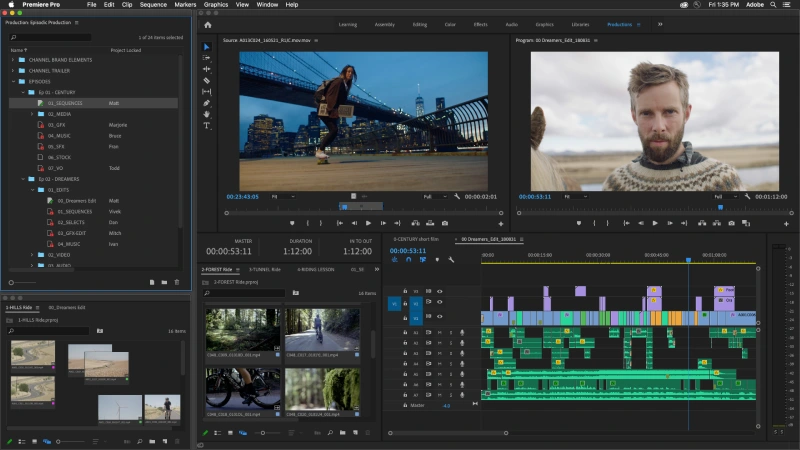
In ai video editing, Adobe Premiere Pro (with AI features) is a professional video editing tool widely used by creators and filmmakers. It includes powerful AI tools powered by Adobe Sensei and Firefly to speed up editing workflows. The software offers features like text-based editing, allowing users to edit videos by editing transcripts. AI-powered tools like auto-captioning and translation help reach a global audience easily. It also includes smart features like scene detection and object masking for faster editing. Generative Extend can add extra frames or audio to clips seamlessly. AI audio tools enhance speech quality and remove background noise. Auto Reframe helps resize videos for platforms like social media.
Key Features:
- AI auto-cut (Scene Edit Detection)
- Smart reframing
- Advanced editing tools
- High-quality output
Best for: Professional editors
Benefits of AI Video Cutting
Using AI video editing tools offers several advantages:
AI video cutting helps save time by automatically trimming unnecessary parts of a video.
It removes silences, pauses, and filler words, making content more engaging.
The technology improves editing speed, allowing creators to produce videos faster.
It ensures consistency and accuracy compared to manual editing.
AI can detect important scenes and highlights, improving overall video quality.
It reduces the need for advanced editing skills, making it beginner-friendly.
Creators can focus more on creativity rather than repetitive editing tasks.
Overall, AI video cutting increases efficiency and enhances the final output quality.
AI video cutting helps save time by automatically trimming unwanted parts of a video.
It removes pauses, silences, and filler words, making content smoother and more engaging.
The process increases editing speed, allowing creators to produce videos quickly.
It improves accuracy and consistency compared to manual cutting.
AI can detect highlights and key moments, enhancing the overall quality of the video.
It reduces the need for advanced editing skills, making it beginner-friendly.
Creators can focus more on storytelling and creativity instead of repetitive tasks.
How to Choose the Best AI Video Editing Tool
When selecting the right tool, consider:
In ai video editing, Choosing the best AI video editing tool requires understanding your specific needs and workflow. First, identify your purpose—whether you are editing social media clips, YouTube videos, or professional content. Next, look for tools with strong AI features like auto-cutting, subtitles, and scene detection. Consider ease of use, especially if you are a beginner, as simple interfaces save time. Check compatibility with your device and export formats for different platforms. Pricing and free trial options are also important before committing. Speed and performance matter, as faster tools improve productivity. Integration with other apps or platforms can enhance your workflow. Finally, choose a tool that balances automation with manual control for the best results.
Choosing the best AI video editing tool requires careful evaluation of your needs and goals.
First, identify your purpose, such as social media content, tutorials, or professional videos.
Look for essential AI features like auto-cutting, subtitles, and scene detection to save time.
Consider the balance between automation and manual control for better flexibility.
Check the quality of output and whether it supports high-resolution exports.
Evaluate ease of use, especially if you are a beginner, as simple tools improve efficiency.
Compare pricing plans, free trials, and any limitations like watermarks.
Also, ensure compatibility with your device and integration with other platforms.
Finally, choose a tool that offers the right mix of features, performance, and affordability.
- Ease of use – Beginner or advanced?
- Features – Subtitles, auto-cut, effects
- Budget – Free vs paid plans
- YouTube, reels, businessChoosing the best AI video editing tool depends on your needs, skill level, and budget. First, consider ease of use—beginners should look for tools with simple interfaces and automation features. Next, check the AI capabilities such as auto-cutting, subtitles, and scene detection.
Future of AI Video Editing
AI is evolving rapidly. In the near future, we can expect:
In ai video editing, The future of AI video editing is set to become more advanced and user-friendly. AI will automate complex tasks like scene detection, color correction, and sound design. Tools will generate complete videos from simple text prompts or ideas. Real-time editing and instant rendering will improve workflow speed. Personalization features will allow creators to tailor content for specific audiences.
AI avatars and voice cloning will make content creation easier without needing cameras or studios. Integration with platforms like YouTube and Instagram will become more seamless. Overall, AI will make video editing faster, smarter, and accessible to everyone.The future of AI video editing will bring smarter automation and creative freedom for users.
The future of AI video editing will focus on greater automation and creative control.
AI will be able to generate entire videos from simple ideas or short prompts.
Real-time editing and faster rendering will significantly improve workflow efficiency.
Advanced personalization will allow creators to tailor videos for specific audiences.
Integration with platforms like TikTok and YouTube will become more seamless.
AI-driven visual effects and animations will reduce the need for manual editing skills.
Cloud-based tools will support global collaboration in real time.
Overall, AI will make video editing more accessible, faster, and highly innovative.
- Fully automated video creation
- Real-time editing suggestions
- Voice-controlled editing
- Hyper-personalized video content
Conclusion
AI has completely transformed the way we edit videos. With tools like Runway ML, Descript, and Pictory, AI video cutting is now faster, easier, and more accessible than ever.
Whether you’re a beginner or a pro, these AI video editing tools can save time, boost productivity, and help you create high-quality content effortlessly and more to know click here Blogs.
In conclusion, AI video editing tools are transforming the way content is created and shared in today’s digital world. Platforms like Wisecut, Descript, Pictory, Kapwing, and VEED.io have made video production faster, easier, and more accessible. These tools use automation to handle tasks like cutting, subtitles, and audio enhancement, saving creators valuable time.
As technology continues to evolve, AI will play an even bigger role in simplifying complex editing processes. Beginners can now create professional-quality videos without advanced technical skills, while experienced editors can boost productivity. The availability of cloud-based platforms also allows users to work from anywhere with ease.
Choosing the right tool depends on your goals, budget, and level of expertise. Each platform offers unique features that cater to different types of creators, from marketers to educators and YouTubers. Exploring free trials and comparing features can help in making the best decision.
Overall, AI video editing tools are shaping the future of content creation by making it more efficient and innovative. They empower individuals and businesses to produce engaging videos quickly, helping them stay competitive in the fast-growing digital landscape.